martes, 30 de junio de 2020

Top 17 Hacking Websites 2018

  1. Offensive Security Training: Developers of Kali Linux and Exploit DB, and the creators of the Metasploit Unleashed and Penetration Testing with Kali Linux course.
  2. Hakin9: E-magazine offering in-depth looks at both attack and defense techniques and concentrates on difficult technical issues.
  3. SecurityFocus: Provides security information to all members of the security community, from end users, security hobbyists and network administrators to security consultants, IT Managers, CIOs and CSOs.
  4. HackRead: HackRead is a News Platform that centers on InfoSec, Cyber Crime, Privacy, Surveillance, and Hacking News with full-scale reviews on Social Media Platforms.
  5. The Hacker News: The Hacker News — most trusted and widely-acknowledged online cyber security news magazine with in-depth technical coverage for cybersecurity.
  6. SecTools.Org: List of 75 security tools based on a 2003 vote by hackers.
  7. DEFCON: Information about the largest annual hacker convention in the US, including past speeches, video, archives, and updates on the next upcoming show as well as links and other details.
  8. NFOHump: Offers up-to-date .NFO files and reviews on the latest pirate software releases.
  9. Phrack Magazine: Digital hacking magazine.
  10. Exploit DB: An archive of exploits and vulnerable software by Offensive Security. The site collects exploits from submissions and mailing lists and concentrates them in a single database.
  11. KitPloit: Leading source of Security Tools, Hacking Tools, CyberSecurity and Network Security.
  12. Hack Forums: Emphasis on white hat, with categories for hacking, coding and computer security.
  13. Hacked Gadgets: A resource for DIY project documentation as well as general gadget and technology news.
  14. Makezine: Magazine that celebrates your right to tweak, hack, and bend any technology to your own will.
  15. Metasploit: Find security issues, verify vulnerability mitigations & manage security assessments with Metasploit. Get the worlds best penetration testing software now.
  16. Packet Storm: Information Security Services, News, Files, Tools, Exploits, Advisories and Whitepapers.
  17. Black Hat: The Black Hat Briefings have become the biggest and the most important security conference series in the world by sticking to our core value: serving the information security community by delivering timely, actionable security information in a friendly, vendor-neutral environment.

miércoles, 10 de junio de 2020

S2 Dynamic Tracer And Decompiler For Gdb

Decompiling is very useful for understanding srtipped binaries, most dissasemblers like IDA or Hopper have a plugin for decompiling binaries, generating a c like pseudocode.

Static analysis, is very useful in most of cases, specially when the binary is not so big, or when you just have an address where to start to analyze. But some algorithms will be learned in less time by dynamic analysis like tracing or debugging.

In cookiemonsters team, we are working on several tracers with different focus, but all of them mix the concept of tracing and decompiling to generate human-readable traces.

S2 is my tracer & decompiler plugin for gdb, very useful for ctfs.
Some of the features are:

- signed/unsigned detecion
- conditional pseudocode (if)
- syscall resolution
- unroll bucles
- used registers values
- mem states
- strings
- logging


Related posts

Voodoo-Kali - Kali Linux Desktop On Windows 10

Iemhacker-kali-windows

How it works?
 * Kali Linux with XFCE Desktop Environment in Windows Subsystem for Linux (WSL)
 * VcXsrv X Server for Windows is doing the hard GUI lifting
 * XFCE is started natively in WSL and displayed by VcXsrv

Install Voodoo-Kali:
 1, Enable WSL and install Kali Linux from the Microsoft Store. Read Install Kali Linux desktop on Windows 10 from Microsoft Store

 2, To start Kali Linux in Windows 10, open Command Prompt and enter the command: kali

 3, Enter this commands:
      apt install wget -y 
      wget https://raw.githubusercontent.com/Re4son/WSL-Kali-X/master/install-WSL-Kali-X
      bash ./install-WSL-Kali-X

 4, Download and install VcXsrv Windows X Server from SourceForge

 5, Start VcXsrv, accept change in firewall rules, exit VcXsrv

Run Voodoo-Kali:
   Start kali in Windows as normal user (that's default), and launch Voodoo-Kali:
    * as normal user: ./start-xfce
    * as root: sudo /root/xtart-xfce

Run Kali Desktop in an RDP session:
   In Kali Linux WSL, type: sudo /etc/init.d/xrdp start
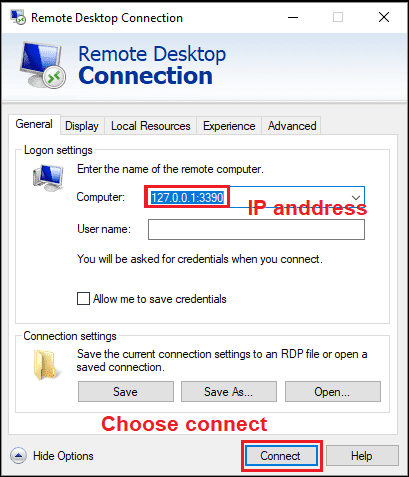
   In Windows 10, open Run and enter mstsc.exe and connect to "127.0.0.1:3390"
remote%2Bdesktop

Status: Voodoo-Kali is in its infancy and it is far from being elegant. I'm working on it though and step by step I'll push out improvements. Below a snippet of the To-Do list:
 * Clean up and comment the scripts
 * Make for a cleaner exit
 * Better error handling and dependency checking (get rid of sleep, etc.)
 * Improve stability of Java programs
 * Improve the looks??
 * …

   Any help is truly appreciated, in any shape or form – from tips to pull requests.
   Why don't you join the forums to discuss?

Further Information:
 * Offsec – Kali Linux in the Windows App Store
 * MSDN – Windows Subsystem for Linux Overview

                                       Download Voodoo-Kali
Related word

Wafw00F: The Web Application Firewall Fingerprinting Tool

How does wafw00f work?
   To do its magic, WAFW00F does the following steps:
  • Sends a normal HTTP request and analyses the response; this identifies a number of WAF solutions.
  • If that is not successful, wafw00f sends a number of (potentially malicious) HTTP requests and uses simple logic to deduce which WAF it is.
  • If that is also not successful, wafw00f analyses the responses previously returned and uses another simple algorithm to guess if a WAF or security solution is actively responding to wafw00f's attacks.

   For further details, check out the source code on EnableSecurity's main repository.

What does it detect? WAFW00F can detect a number of firewalls, a list of which is as below:

wafw00f's installation
   If you're using Debian-based distro, enter this commands to install wafw00f: sudo apt update && sudo apt install wafw00f

   But if you're using another Linux distro, enter these commands to install wafw00f:

How to use wafw00f?
   The basic usage is to pass an URL as an argument. Example:

Final Words to you
   Questions? Pull up an issue on GitHub Issue Tracker or contact to EnableSecurity.
   Pull requests, ideas and issues are highly welcome. If you wish to see how WAFW00F is being developed, check out the development board.

   Some useful links:

   Presently being developed and maintained by:

Read more

  1. Hacking Tools
  2. Pentest Devices
  3. Hacking Device
  4. Pentest Active Directory
  5. Hacking Gif
  6. Hacker Attack
  7. Pentest Framework
  8. Pentest Environment